Buying a TV sounds simple until you start measuring your desk, console, or bedroom wall and realize that “24 inches” doesn’t tell the full story. That tiny number only measures the screen diagonally, leaving out the width, height, depth, and even the little quirks of the stand. Understanding 24 inch TV dimensions is like knowing exactly how many marshmallows fit in a bag before you dig in crucial if you don’t want a tight squeeze. This guide breaks down every inch, from width to depth, explains viewing distance, compares similar sizes, and shows you how to fit your new TV perfectly without headaches or guesswork.
What Does 24 Inches Mean on a TV
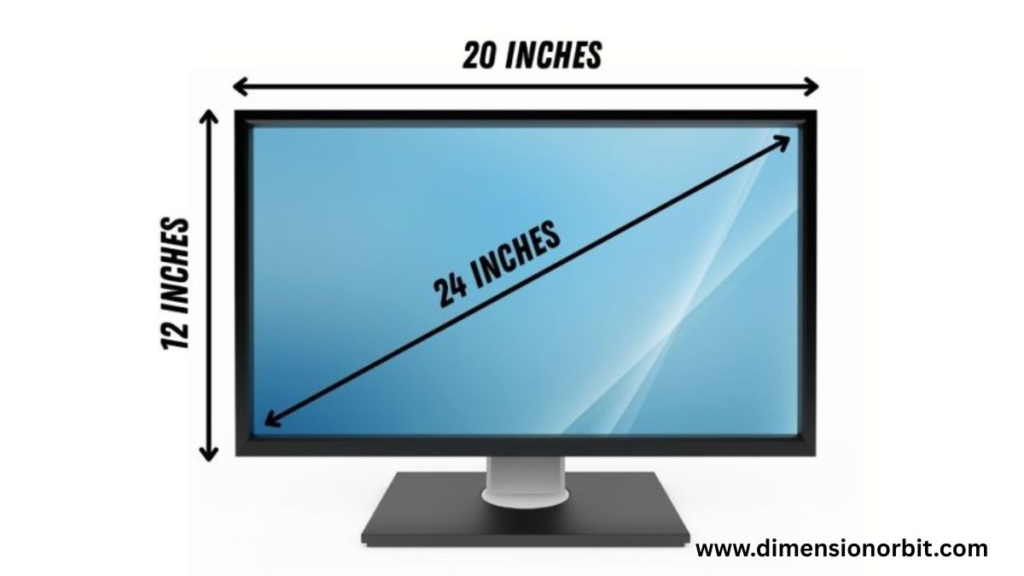
When a TV is labeled as 24 inches, it measures the screen diagonally from corner to corner. This doesn’t indicate the width, height, or overall footprint of the TV. For small TVs like 24 inch models, understanding the actual dimensions is critical because these units are often used in bedrooms, kitchens, offices, or dorm rooms where space is limited.
The diagonal size only tells you the screen area. Factors like bezel thickness, stand design, and TV depth affect the real 24 inch TV size. Two TVs advertised as 24 inches may have slightly different physical dimensions due to design variations, which is why measuring your space carefully before purchase is essential.
Quote: “A TV’s diagonal is marketing. Width and height are reality.”
Exact 24 Inch TV Dimensions (Width, Height, Depth)
Most modern 24 inch TVs follow a 16:9 aspect ratio, standard for LED and LCD displays. This allows for fairly consistent dimensions across brands.
Without Stand
- Width: 21 inches (53.3 cm)
- Height: 12 inches (30.5 cm)
- Depth: 2.5 inches (6.3 cm)
With Stand
- Width: 21 inches (53.3 cm, unchanged)
- Height: 13.5 inches (34.3 cm)
- Depth: 5.5 inches (14 cm)
Depth varies by stand design and model. Ultra slim TVs might have slightly smaller footprints, while models with built in speakers or larger bases add depth.
24 Inch TV Dimensions Table (Inches & Centimeters)
| Measurement Type | Inches | Centimeters |
|---|---|---|
| Screen Diagonal | 24 in | 61 cm |
| Width | 21 in | 53.3 cm |
| Height (Without Stand) | 12 in | 30.5 cm |
| Height (With Stand) | 13.5 in | 34.3 cm |
| Depth (Without Stand) | 2.5 in | 6.3 cm |
| Depth (With Stand) | 5.5 in | 14 cm |
| Average Weight (Without Stand) | 7–10 lb | 3.2–4.5 kg |
| Average Weight (With Stand) | 8–11 lb | 3.6–5 kg |
This table gives a clear view of the real size of a 24 inch TV, including stand footprint and weight considerations.
How Wide Is a 24 Inch TV
A 24 inch TV is about 21 inches wide in real life. Width remains constant whether or not the stand is attached, as the stand typically increases depth and height rather than width. Bezel thickness can cause small variations, usually less than half an inch.
Understanding width helps answer practical questions like, will a 24 inch TV fit on my desk? or can it sit on my kitchen counter without overhanging? Planning for a few extra inches ensures stability and prevents tight fits.
24 Inch TV Height and Vertical Clearance

Height is important for wall mounts or furniture placement. Without a stand, a 24 inch TV sits at around 12 inches tall. With the stand, height increases to approximately 13.5 inches.
For wall-mounted TVs, leave at least 2 inches of clearance above and below for ventilation and cable connections. If using a desk or console, make sure the TV height doesn’t interfere with shelves or other items behind it.
Depth of a 24 Inch TV and Clearance Needs
Small TVs like this are surprisingly deep once the stand is considered. Without the stand, depth averages 2.5 inches. With a stand, it can reach 5.5 inches, depending on the base design.
Allowing extra depth for cables ensures that HDMI, power cords, and other peripherals don’t push the TV forward or strain the ports. Proper clearance also prevents overheating and makes the TV easier to move.
24 Inch TV Weight
Weight affects desk stability and wall mounting choices. Most 24 inch TVs weigh 7–10 pounds without the stand, and 8–11 pounds with the stand.
Even though this is light compared to larger TVs, consider weight distribution when placing it on desks or thin shelves. For wall mounting, choose a mount rated well above the TV’s weight to ensure safety.
Will a 24 Inch TV Fit on My Desk or Console
A 24 inch TV is ideal for small desks, kitchen counters, or bedroom dressers. The width of around 21 inches fits most compact surfaces easily. Depth with the stand is around 5.5 inches, so furniture should be at least 6 inches deep for a secure fit.
Center stands are common in smaller TVs and take up less space. Dual leg stands require more surface width but provide extra stability. Always check TV stand footprint rather than just the screen width.
Wall Mounting a 24 Inch TV
Most 24 inch TVs are compatible with VESA patterns of 75×75 mm or 100×100 mm. Wall mounting small TVs is straightforward due to their light weight, but proper clearance is important.
Mount the center of the screen at eye level when seated usually about 42–45 inches from the floor for desktops or 36–40 inches for beds. Tilt mounts can help reduce glare but slightly increase depth from the wall.
24 Inch TV Viewing Distance
Even small TVs have ideal viewing distances. For a 24-inch display, sit around 3–4 feet away from 1080p content. For 4K TVs, you can sit closer, roughly 2.5–3.5 feet, without noticing pixelation.
This ensures comfortable viewing and reduces eye strain. Smaller rooms often benefit from closer placement, while desktops can sometimes require slightly farther distance depending on screen height and tilt.
Room Size Suitability
A 24 inch TV is perfect for bedrooms, kitchens, dorm rooms, offices, or small apartments. It is generally too small for large living rooms unless used as a secondary TV.
If you have a large wall or sit far away, consider a 27 inch or 32 inch model instead. For small spaces, the 24 inch TV strikes a balance between visibility, desk space, and portability.
24 Inch TV Size Comparison
Comparing 24 inch TVs to other sizes helps buyers decide upgrades or downsizing.
- 24 inch vs 22 inch TV: 24 inch offers slightly more width ( 1.5–2 inches) and screen area, better for desktops or slightly larger rooms.
- 24 inch vs 27 inch TV: 27 inch increases width by 2.5 inches and height by 1.5 inches, ideal if viewing distance allows.
- 24 inch vs 32 inch TV: 32 inch TVs are significantly bigger and better for living rooms but too large for most desks.
This TV size comparison chart shows exact differences and helps buyers pick the right fit.
24 Inch TV Dimensions in Centimeters
For metric users:
- Width: 53.3 cm
- Height without stand: 30.5 cm
- Height with stand: 34.3 cm
- Depth without stand: 6.3 cm
- Depth with stand: 14 cm
- Screen diagonal: 61 cm
Metric conversions help with international purchases and furniture planning.
24 Inch TV Dimensions in Feet
Thinking in feet makes space visualization easier:
- Width: 1.75 ft
- Height without stand: 1 ft
- Height with stand: 1.13 ft
- Depth with stand: 0.46 ft
These figures help ensure your desk or counter can safely accommodate the TV.
Transporting a 24 Inch TV
Transporting small TVs is easier than larger ones, but precautions are still important. Boxes measure slightly larger than the screen, around 25×15×6 inches.
Small TVs can fit in sedans, hatchbacks, or SUVs, usually with seats folded. Keep the TV upright during transport to avoid panel stress. Never apply pressure to the screen, and handle the box carefully to prevent damage.
Common Measurement Mistakes to Avoid
Even for a 24 inch TV, buyers often make errors:
- Measuring diagonal instead of width for furniture planning
- Ignoring stand depth, which can cause overhang
- Forgetting wall clearance for ventilation and cables
- Assuming all 24 inch TVs are identical, which can cause tight fits
Careful measurement and planning save headaches later.
Digital tool
Digital tools like Feet and Inches Calculator can convert inches to centimeters or feet instantly. Many smartphone apps now offer augmented reality measuring features, allowing you to gauge objects virtually and compare them to known lengths.
FAQs
What does 24 inches mean on a TV?
The 24 inches refers only to the diagonal measurement of the screen from one corner to the opposite corner. It does not indicate the TV’s width, height, or overall footprint, which is why checking the actual dimensions is essential before buying.
How wide is a 24 inch TV?
Most 24 inch TVs are about 21 inches wide, though small differences exist due to bezel thickness and brand design. Always measure your space to ensure a proper fit.
What is the height of a 24 inch TV?
Without a stand, the height is approximately 12 inches. With the stand attached, it rises to about 13.5 inches, which matters when placing it on desks or shelves.
What are the 24 inch TV dimensions in inches?
A typical 24 inch TV measures 21 inches wide, 12 inches tall without the stand, and about 2.5 inches deep. With the stand, depth increases to roughly 5.5 inches.
What are the 24 inch TV dimensions in centimeters?
In metric terms, the width is about 53.3 cm, height without stand 30.5 cm, height with stand 34.3 cm, and depth ranges from 6.3 cm to 14 cm depending on the stand.
How heavy is a 24 inch TV?
Weight ranges from 7–10 pounds without the stand and 8–11 pounds with the stand. Even though light, ensure furniture or wall mounts can safely support it.
Will a 24 inch TV fit on my desk or console?
Yes, most 24 inch TVs fit comfortably on desks, consoles, or small tables. Make sure your furniture is slightly wider than 21 inches and deep enough for the stand and cables.
What is the ideal viewing distance for a 24 inch TV?
For 1080p content, sit around 3–4 feet away. For 4K TVs, you can sit closer, around 2.5–3.5 feet, without noticing pixels.
Is a 24 inch TV too small for a bedroom?
It depends on room size and viewing distance. For small bedrooms or desks, it’s perfect. For larger rooms where you sit farther away, a bigger TV might provide a better viewing experience.
What VESA pattern does a 24 inch TV use?
Most 24-inch TVs use 75×75 mm or 100×100 mm VESA mounting patterns. Always confirm your specific model before purchasing a wall mount.
How far should you sit from a 24 inch TV?
The ideal distance is around 3–4 feet for HD TVs. Sitting too close may strain your eyes, while sitting too far reduces detail clarity.
Can two 24 inch TVs have different sizes?
Yes. Bezel thickness, stand design, and manufacturer variations can make two 24 inch TVs slightly different in width, height, and depth, even though the diagonal measurement is the same.
Final Size Reality Check
A 24 inch TV is compact, versatile, and ideal for small rooms, desks, or kitchens. Understanding 24 inch TV dimensions, including width, height, depth, and weight, ensures it fits perfectly. Plan for clearance, consider viewing distance, and check furniture fit. Small TVs like this prove that even modest screens can deliver excellent viewing experiences without overwhelming your space.

Jhon AJS, the author of Dimension Orbit, is an experienced blogger fascinated by the mysteries of existence. He explores every type of dimension from scientific to spiritual with clarity and creativity. Jhon’s engaging writing style invites readers to think deeper, question reality, and discover new perspectives on the universe.