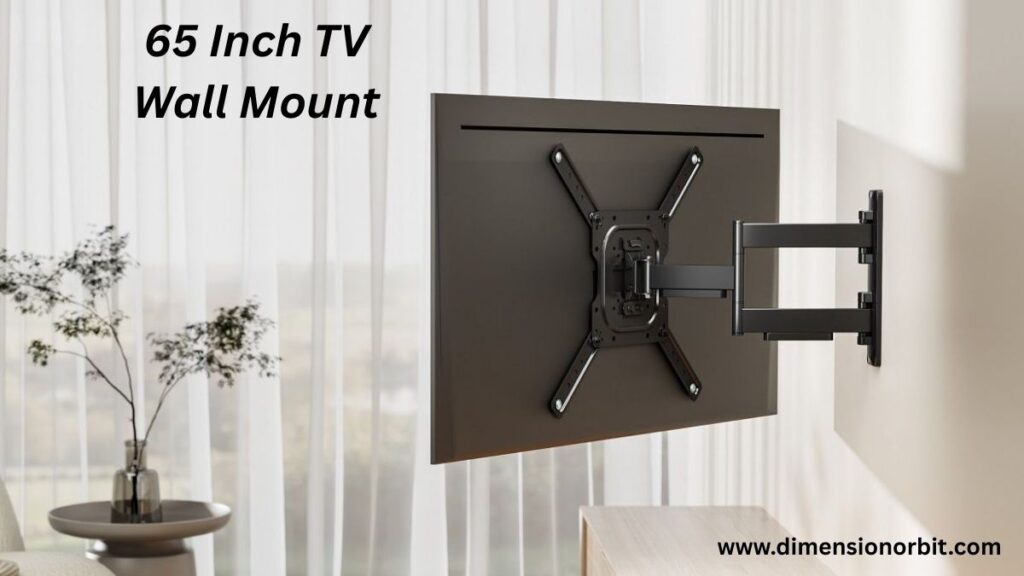
Buying a 65 inch TV wall mount feels simple until you’re standing there with a drill, a confused stud finder, and a growing sense of regret. That giant screen suddenly looks heavier. The wall looks weaker. Gravity feels personal. One wrong move and your “cinema upgrade” turns into a very expensive lesson in physics. The good news is this doesn’t have to be stressful, awkward, or wall destroying. With the right mount, the right height, and a little planning, a 65 inch TV can look sleek, safe, and perfectly placed. This guide breaks it all down clearly, calmly, and without the guesswork.
Why a 65 Inch TV Wall Mount Is Different From Smaller Sizes
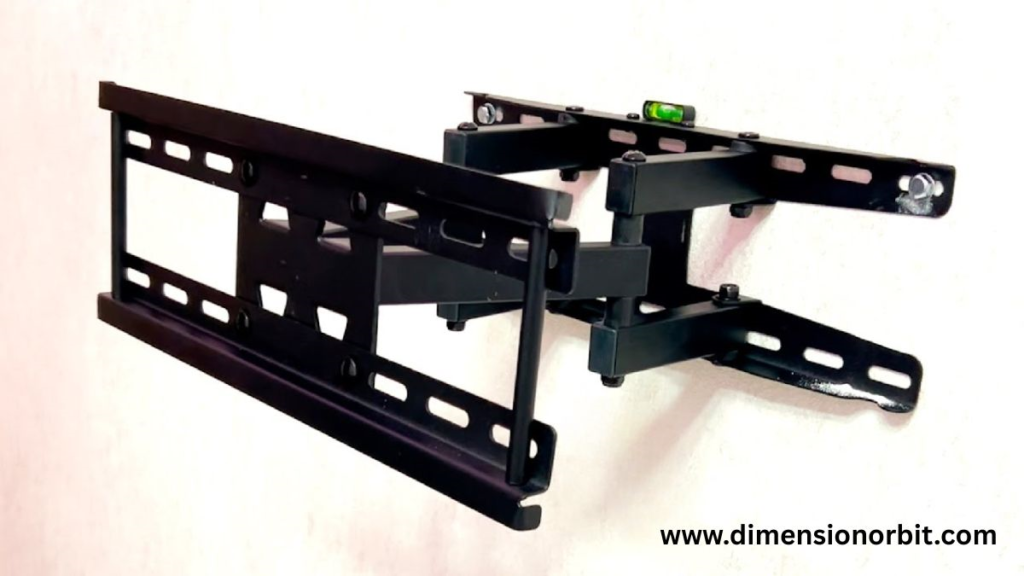
Mounting a large television isn’t just a scaled up version of mounting a smaller one. A 65 inch screen creates leverage. The weight spreads farther from the wall, and any movement multiplies stress on the bracket and the anchors behind it. That’s why mounts designed for smaller TVs often fail when people try to reuse them for a larger display.
A proper TV wall mount for 65 inch television accounts for width, weight, and torque. It also allows enough clearance for airflow and cable routing without forcing the TV too far forward. This balance is what separates a safe, clean installation from one that constantly feels wrong.
Do All 65 Inch TVs Use the Same Wall Mount?
Screen size alone doesn’t determine compatibility. The real deciding factor is the VESA pattern. VESA refers to the spacing between the mounting holes on the back of the TV, measured in millimeters. Two 65 inch TVs can look identical from the front and still require completely different mounts.
Most modern 65 inch TVs use VESA patterns like 400×400 or 600×400. Some premium or heavier models use wider patterns. A 65 inch TV mounting bracket must support the exact pattern your TV uses. If the pattern doesn’t match, the mount won’t align properly, no matter how adjustable it claims to be.
Checking the VESA size is simple. It’s listed in the TV’s manual, on the manufacturer’s website, or easily measured with a tape measure across the mounting holes. This step prevents wasted money and unnecessary returns.
How Much a 65 Inch TV Weighs and Why That Matters

Weight is the most underestimated factor when buying a mount. Most 65 inch TVs weigh between 45 and 70 pounds without the stand. OLED models often fall on the lighter side, while mini LED and thicker LED panels trend heavier. Once you add the mounting hardware and consider movement from tilting or swiveling, the effective load increases.
A heavy duty wall mount for 65 inch TV should always support at least 100 pounds. That extra capacity isn’t optional. It absorbs long term stress and protects against sudden shifts when adjusting the screen. Choosing a mount rated too close to the TV’s actual weight is one of the most common mistakes people make.
36 Inch TV Dimensions and Real Measurements
the Main Types of 65 Inch TV Wall Mounts

Fixed mounts keep the TV close to the wall and offer the cleanest appearance. They work best when the TV sits at eye level and glare isn’t an issue. Because they don’t move, they place less stress on the wall over time, which makes them reliable and affordable. A low profile wall mount for 65 inch TV is ideal for minimalist setups where the TV never needs adjustment.
Tilting mounts add vertical movement, allowing the screen to angle downward slightly. This design helps when the TV sits higher than eye level or when overhead lights cause reflections. Many people consider this the safest all around option because it improves comfort without adding too much mechanical complexity. A best tilting mount for 65 inch TV usually supports heavier weights and offers better cable access.
Full motion mounts extend outward and swivel side to side. They provide maximum flexibility and work well in open rooms or corner placements. However, they also place the most stress on the wall and anchors. Choosing the best full motion mount for 65 inch TV means prioritizing build quality over price. Cheap articulating mounts wear out quickly and can loosen over time.
Wall Type and Why It Dictates Your Mount Choice

Most homes use drywall over wood studs. In these cases, studs carry the load, not the drywall itself. A TV mount compatible with 65 inch TV must align with studs spaced sixteen inches apart or offer horizontal adjustment to reach them. Anchoring a large TV into drywall alone is unsafe and should never be considered a long term solution.
Concrete and brick walls offer much more flexibility. They can handle heavy loads when proper masonry anchors are used. Mounting a 65 inch TV on concrete wall is often more secure than stud based installs, provided the drilling is done correctly.
Finding the Right Viewing Height Without Guessing

Mounting height directly affects comfort. The center of the screen should align with eye level when seated, which typically places it between forty two and forty eight inches from the floor. Mounting higher forces your neck upward and quickly becomes uncomfortable during long viewing sessions.
When mounting above a fireplace, tilting becomes essential. Heat clearance also matters, and the TV should sit far enough above the mantel to avoid prolonged exposure to rising heat.
Understanding how high to mount a 65 inch TV prevents one of the most common installation regrets.
Choosing the Best 65 Inch TV Wall Mount for Your Space
The best mount depends on how you use the room. Living rooms with multiple seating positions benefit from motion mounts that adjust easily. Bedrooms often work better with tilting mounts that handle higher placement. Media rooms focused on aesthetics usually pair well with fixed mounts.
A universal wall mount for 65 inch TV should support a wide VESA range, high weight capacity, and solid steel construction. Price matters, but durability matters more. A cheap wall mount for 65 inch TV may work temporarily, but long term reliability usually comes from better materials and stronger welds.
How to Wall Mount a 65 Inch TV Safely
Mounting a large TV requires preparation more than strength. The process starts with locating studs or marking anchor points in masonry. Measurements come next, ensuring the mount centers correctly and sits at the planned height. Drilling pilot holes prevents splitting studs or cracking masonry.
Attaching the wall plate securely is the most important step. Once that’s done, brackets attach to the TV, and the screen is lifted into place with help. Attempting to mount a 65 inch TV alone increases the risk of drops and alignment errors. Two people make the process safer and more precise.
Understanding how to mount a 65 inch TV isn’t about memorizing steps. It’s about respecting weight, leverage, and structure.
Mistakes People Make When Mounting a 65 Inch TV
Mounting too high remains the most frequent mistake. Others include failing to hit studs, choosing mounts rated too close to the TV’s weight, or ignoring cable routing until after installation. Each of these issues creates unnecessary complications that could have been avoided with better planning.
Knowing things to check before mounting a TV saves time, money, and frustration.
Cable Management and the Difference It Makes
A clean mount deserves clean cable routing. In wall cable management creates the sleekest look but requires in wall rated cables. Surface-mounted raceways provide a safer alternative and still look polished when painted to match the wall.
Placing a power outlet behind the TV eliminates dangling cords and reduces strain on connectors. Planning this step before mounting prevents the need to remove the TV later.
Living Room vs Bedroom Mounting
A living room setup often prioritizes flexibility. A full motion mount allows the TV to face different seating positions throughout the day. In contrast, a bedroom setup typically values simplicity. A tilting mount handles higher placement while maintaining comfortable viewing angles.
Same TV size. Different needs. This contrast highlights why there’s no single “best” mount for everyone.
Common Questions About 65 Inch TV Wall Mounts
Many people ask whether any mount can hold a 65 inch TV. The answer depends on VESA compatibility and weight rating. Others wonder if full motion mounts are safe. They are, when properly rated and installed into solid structure. Hiring a professional becomes worthwhile for complex walls, fireplaces, or masonry installs.
Best 65 Inch TV Wall Mounts Comparison
| Mount Type | Weight Capacity | VESA Compatibility | Best Use Case | Price Range |
|---|---|---|---|---|
| Fixed / Low Profile | 120 lbs | Up to 600×400 | Minimalist setups, eye level viewing | $$ |
| Tilting | 110 lbs | Up to 600×400 | Glare reduction, slightly higher placement | $$ |
| Full Motion / Articulating | 100 lbs | Up to 600×400 | Flexible viewing, corner or open plan rooms | $$$ |
| Budget Fixed | 90 lbs | Up to 400×400 | Lightweight TVs, temporary setups | $ |
Digital tool
Digital tools like Feet and Inches Calculator can convert inches to centimeters or feet instantly. Many smartphone apps now offer augmented reality measuring features, allowing you to gauge objects virtually and compare them to known lengths.
FAQs
Can any wall mount hold a 65 inch TV?
Not all mounts are created equal. The mount must support both the weight of your TV and the VESA pattern. Choosing a mount rated too low can risk damage or accidents. Always check the specifications before buying.
How much does a 65 inch TV weigh?
Most 65 inch TVs weigh between 45–70 pounds without the stand. OLED models are lighter, while mini LED or thicker panels can be heavier. Your mount should support at least 100 pounds for safety.
Do all 65 inch TVs use the same mount?
No. Even TVs with the same screen size can have different VESA patterns. Always measure or check the manual to confirm compatibility with your chosen wall mount.
Can you mount a 65 inch TV by yourself?
Technically yes, but it’s not recommended. Two people ensure the TV goes up safely, stays level, and avoids damage to walls or the screen.
How high should I mount a 65 inch TV?
The center of the screen should generally be 42–48 inches from the floor when seated. Mounting above a fireplace or on a tall wall may require a tilting mount to reduce neck strain.
Is a full motion mount safe for a 65 inch TV?
Yes, as long as the mount is rated for the TV’s weight and installed properly into studs or masonry. Cheap mounts or improper installation can compromise safety.
Can a 65 inch TV be mounted above a fireplace?
Yes, but consider heat clearance and eye level viewing. A tilting mount is highly recommended to angle the screen downward and reduce strain.
What size wall mount do I need for a 65 inch TV?
Choose a mount that matches your TV’s VESA pattern, supports its weight, and fits the wall type. For most 65 inch TVs, this means 400×400 or 600×400 VESA compatibility with a weight rating of at least 100 lbs.
Final Thought
A 65 inch TV wall mount isn’t just about hanging a screen. It’s about safety, comfort, and making the room feel right every time you sit down. When the mount matches your TV’s weight, VESA pattern, and wall type, everything else falls into place. The screen stays level. The wall stays intact. Viewing feels natural instead of forced. Take time to measure, choose strength over shortcuts, and plan the install before touching a drill. Do it once, do it right, and that big screen will look like it was always meant to live on your wall.

Jhon AJS, the author of Dimension Orbit, is an experienced blogger fascinated by the mysteries of existence. He explores every type of dimension from scientific to spiritual with clarity and creativity. Jhon’s engaging writing style invites readers to think deeper, question reality, and discover new perspectives on the universe.